









Multiple Target Languages Subtitles Translation
This day marks the start of another, hopefully, handy feature to translate subtitles to multiple target languages quickly and easily. This has been requesting a lot, especially from YouTubers who want to increase their audience by providing subtitles in multiple languages for their videos.
While this was possible before using my Online Subtitles Translator too, the process itself was quite laborious – where the user has to upload a single file, but for each target language translation, do the steps like these:
- Selected target language
- Click the “Translate” button to begin translation.
- Wait for it to finish (a few seconds to a minute or so depending on length).
- Do any post-translation edits.
- Save-As the file
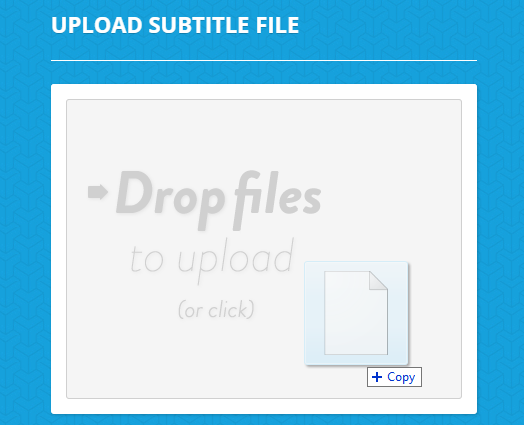
And then repeat the above steps for each new target language. The new enhancements to the Subtitle Translation tool make it quite convenient to translate to multiple languages too. All you have to do is upload one or more subtitle files (.SRT, .SUB, .ASS and .VTT formats supported) by dragging these to the drop file area:
Once that’s done, select your target translator like Google, DeepL, Microsoft, etc – yes, it works with both free and paid translators. And select your target language. At this point, now you can add multiple translation languages by clicking the  button, and selecting one or more target languages as shown below:
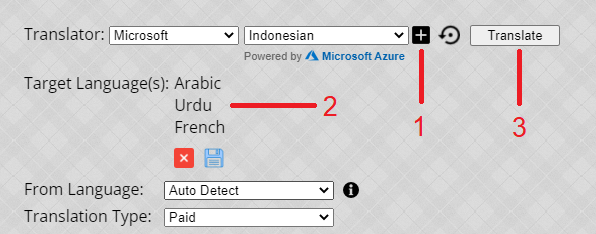
Tip: You can save your language selection by clicking the “Save” icon at the bottom of the list. This way, the next time you upload subtitle file(s), you can restore your last selection by clicking the  icon next in the Translator bar.
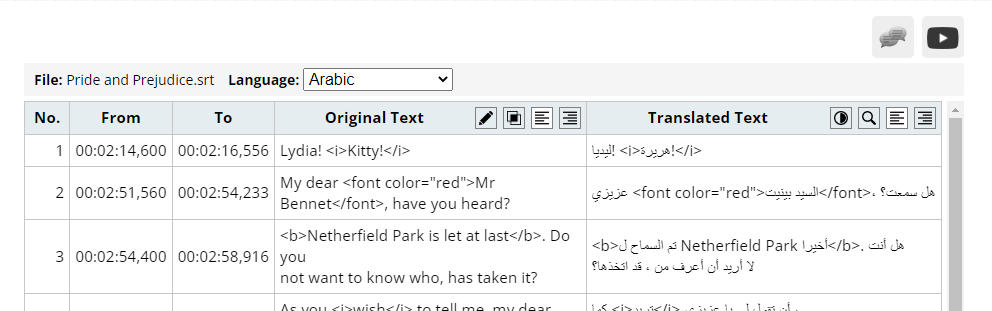
Once you are happy with the language selection, just click the “Translate” button as you normally do for single-language translation, and wait for it to finish. Once the translation is done, you can review – and edit subtitles – if you like by selecting the translated language from the drown-down above the translation area as shown below:
And that’s mostly it! Once you are done with the review process, you can download all these translated files in a single ZIP file format by just clicking the “Save All” button:

Hope you find this a time-saving feature, and that it helps promote your videos. As always, I’m looking forward to your suggestions and feedback.
Dear Akbar,
Hello, good day.
I really appreciate your work for subtitle translation. It is so useful and fast. The translation is accurate and usable for most of the time.
I use it mainly for translation from English to Persian.
One specific point for Persian translation exists: To correctly display punctuations like . , ; … : ! ? for the Persian texts, they should be moved to other end of translated text, this behavior is noticed on players like VLC at least.
Keep Up the good work and wishing you health and happiness.
Hi Imran,
Thanks for your feedback, and I’m glad you are finding this tool mostly helpful.
Regarding the language direction query/issue for the Persian language, I think this problem will be solved if you check the “Embed Language Bi-Directional codes” option when downloading the subtitle file. This option is visible under Save Settings (at top right, under the Save As butotn). I hope this helps.
Regards,
Akbar
Hello, I have the SRT file in french. I need an accurate English Translation. Am prepared to pay. Please advise
All of the translations offered on my website are machine translations, so even though I think the are very good, these are not always accurate. But most of these translator achieves around 80-90% of the human translation quality. I would suggest to try the following translators (in order of preference):
1) DeepL
2) OpenAI Chat-GPT
3) Gemini
All of these have demo modes as well, so you can first upload the SRT file and see which translation seems to be doing well for you. I hope this helps.
Regards, Akbar
01/04/2023 error 06 Lỗi không có dữ liệu trong khi có dữ liệu
Thanks for reporting back. Hopefully, this issue is now fixed. Please let me know if still experiencing this problem.
Regards, Akbar
Good
Can’t do that. I can’t translate and also save as.
Are you running into any particular error, or it simply doesn’t work. If you can share the steps where you are having problems, I can look into this as a priority.
BTW, I just fixed a problem related to the Save-As of multiple files. So I would just clear your browser cache to see if that helps.
Regards, Akbar