
Archive for the ‘Uncategorized’ Category

Unicode Programming In Microsoft Visual C/C++

Monday, September 27th, 2010

If you program Unicode applications using Microsoft Visual C/C++ compiler, then you most probably use the TCHAR strings. While using TCHAR strings is very easy, one of the most common problem for me, after a years of ANSI string experience, is to find a correct C/C++ string function to do the same job as I used to do for the ANSI string.

For example, for ANSI string, we use strlen, but for the TCHAR strings, it’s _tcsclen. Though these TCHAR strings functions use a specific naming convention, and one can easily figure out the corresponding function equivalent of ANSI function, but it does require a hit and try. When doing a search today on Google, I found a wonderful reference which I not only bookmarked, but I would like to share with others too. So, here it’s:
http://www.inwa.net/~frog/tcharConversionChart.html

While we are discussing Unicode, here is another wonderful web resource regarding Internationalization and Localization:
http://www.i18nguy.com/

I'm back!

Saturday, May 29th, 2010

Sorry to all of those who have been trying to access this site since last week. I had some problems with my previous hosting service and have to shutdown that account.

I have to wait for the next weekend to get all the stuff moved back to the new hosting service and configure it. It was tiring job, but all is done now.  So far everything seems to be running fine and life is back to normal.

“All is well, if end is well”

HTML & JavaScript Compatibility Hell for Programmers

Saturday, May 29th, 2010

If you are HTML Designer or JavaScript programmer, then you may already know the rule that it almost 50% of the development time to make what works in browser,  and another 50% of the time is spent to run it smoothly in all the other popular browsers (some time it takes even more).

Recently, I was working on script where from the on-click event handler I have to find and return the containing iFrame reference. Searching on the Google, I found that you can do this by using something like:

var winReference = activeElement.ownerDocument.parentWindow.frameElement;

But guess what, it was only working in the IE. So now I have to start again the search for the alternatives which works in the all other browsers as well. Doing this, I found one of my long waited reference link:
http://www.quirksmode.org/compatibility.html

The above link contains the comparability tables for the HTML, CSS and DOM. Lot more than what I was expecting. A big thanks to Peter-Paul Koch for maintaining these tables and sharing with the community. It’s now my #1 resource for the compatibility reference.

BTW, for some of you who don’t want to go the compatibility link, the answer to find the parent window reference in the FireFox and other browses is:

var winReference = activeElement.ownerDocument.defaultView.frameElement;

Next time, don’t hit the wall when you stumbled upon some JavaScript issues, check the compatibility tables first.

Hindi to English and Hindi to Urdu Transliteration

Saturday, February 6th, 2010

Urdu and Hindi are two of the most popular languages of sub-continent. The speaker of these two languages combined are more than a billion. However the one major difference between these two languages is how these are written. The Hindi language is written using Devanagari script, while Urdu language is written in Urdu script (oriented from Persian and Arabic).

As a native speaker and reader of Urdu, the Hindi written in Devanagari script would appear to me as alien language even though I would recognize 70 to 80 percent of it when some one actually read that for me. One day tired of this complexity, I started exploring the automatic transliteration options. As always, some very good work is already done on this and here are some of the interesting sites I found for transliteration:
http://www.crulp.org/software/langproc/h2utransliterator.html
http://www.puran.info/HUMT/index.html
http://translate.malerkotla.co.in/

Though these are great, but there are some problems with these transliterations services like:
1. As there is not direct mapping of some characters between these two languages so most of the time transliteration of such characters is not correct e.g. devanagari character ? (za) in Urdu could be mapped to to ?(zay), ?(zoad), ?(zal) and ?(zoin) characters depending on context
2. Some of these transliteration services, just provide a limited text box for transliteration and may be too limiting depending on what you want to convert. Plus you also have to visit their site and copy and paste your content to get the transliteration done.
3. Third and most important, these are slow. I think this is due to the reason that they are actually doing word look-up in the database/dictionary for the mapping. This brings excellent results, but response is slow.

To overcome some of these problems, I have written my own Hindi to English transliteration engine. This transliteration engine follows mixture of ITRANS and IAST Hindi transliteration schemes (to produce more human readable text).

For the Hindi to Urdu transliteration, I decided to use Google Indic Transliteration API. So for this mapping, I first convert the Hindi to Roman and then pass this to Google Transliteration API for Roman to Urdu transliteration. The final results are amazing. You get almost ready to use transliteration. The other plus points are that it’s very fast (that’s why I’m fan of Google), and you can do this transliteration on any page using the Dynamic Language Tools bookmarklet. You can read more about this here:
http://www.syedgakbar.com/products/web/

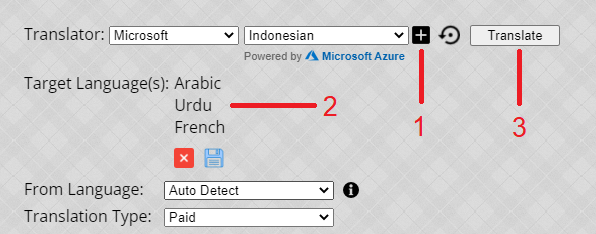
Here is a quick demo of this service in action:
Hindi to English Transliteration

Lightbox – An excellent image viewer control

Sunday, November 25th, 2007


In one of the projects, I have to show a slide show of the image. I searched this on my old and reliable friend Google and as I was expecting (I am being Luck), the first link was of Lightbox 2. As I looked at the control, I was really impressed by it. The thing which really caught my attention it’s very neat and simple way of integrating within HTML pages. Who could have thought other than Lokesh Dhakar such a neat use of REF attribute?

Don’t believe me, just check it out:
http://www.lokeshdhakar.com/projects/lightbox2/

When integrating this into one of the professional site, I found two issues. First issue is that it displays the slide images in full resolution. Though this works fine for most of the small images, but with abundance of 7-8 Mega Pixels digital cameras, now most of the users upload images more than 1024×768 resolutions (the common screen resolution of most of the web-users). So we needed an option to constraint the photo within browser window region (without scrollbars).

The second issue, which is a bit serious, is that if the slideshow target image doesn’t exists (believe me it’s more common than you can think), then it keep displaying the loading animation.

Fortunately, the fixes were very simple and even done more easily due to the existing generic routines. For the first fix, I just added some extra checks in the changeImage function to limit the picture frame within window visible region (only when the image can’t easily fit in). For the second issue, I just added event handler for the “onerror”and “onabort” events for similar to the existing onload event but in that case I displayed an image which I was very sure existed on the site.

That’ all, the site now has a very neat image slide show, all in JavaScript and with proper error handlers.